Is your "second shift" spent at a keyboard? Late-night charting is the leading cause of provider burnout, but it doesn't have to be your reality. #Medicaltranscriptioncompanies help practices reclaim their time by turning dictation into accurate, structured medical records while you focus on life outside the clinic. End the late-night #EMR struggle with our medical transcription company MTS, and let your documentation finish when your day does.
Memphis, TN/Concord, NC -Country music superstar Trace Adkins, and racing legend and NASCAR Hall of Famer Richard Petty just can’t keep out of each other’s worlds. The latest video released as part of BC and Goody’s Pick A Powder campaign shows Richard Petty rocking out on the keyboard while waiting for Trace Adkins’ reaction. Since the campaign started in early 2010, they have been in a friendly rivalry with each other over the air waves, on Facebook, and in videos at PickAPowder.com, all in an effort to get the most fans to join their team and to show who experiences the most pain.
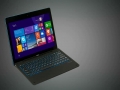
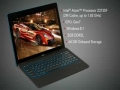
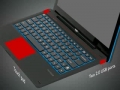
E FUN introduces the Nextbook Flexx line of 2-in-1 tablets with Windows 8.1. The new 11.6” Flexx 11 and its smaller sibling, the 10.1” Flexx 10, deliver a great value with the best features of a tablet and laptop, including a detachable POGO keyboard and touch screen. Designed for the budget-conscious consumer, these Intel-powered tablets are offered at select* Walmart stores and Walmart.com for $227 (Flexx 11) and $178 (Flexx 10). Owners of the Nextbook Flexx tablets can upgrade to Windows 10 for free** starting July 29.
To view the Multimedia News Release, go to http://www.multivu.com/players/English/7515651-e-fun-nextbook-flexx-2-in-1/
Learn how you can easily enable Emoji keyboard on your device!
Send amazing emoji pictures, unique emoticons, turn any word into emoji preset in a tap, and more! Get ultimate Emoji Emoticons Art iOS app https://itunes.apple.com/app/id593449409
How to enable Emoji 2 Keyboard on iOS 6
- Open Settings
- Go to General
- Scroll down and tap Keyboard
- Select Keyboards
- Tap Add New Keyboard
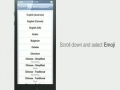
- Scroll down and select Emoji
- Emoji keyboard has been activated. Now you can use Emoji in Messages, Notes, Contacts, and more!
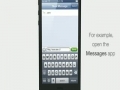
- Open the Messages app, for example
- Tap and hold the Globe at the bottom and then select Emoji
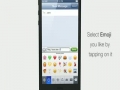
- Select the Emoji you like by tapping on it
http://www.youtube.com/watch?v=Phf-FoJPeOc[EXTRACT]
http://www.PlayPianoCatalog.com Learn how to play piano using phat piano chords. Short piano video demonstrates 7 ways for making phat chords.
Riddle us this: What happens when you take Harlem Globetrotters teammates Wildcat and Buckets out of their element on the court and put them to work at the MSG offices?
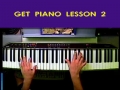
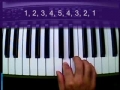
If you are left-handed, this next piano lesson should be a breeze! Now that we have played our first five piano notes using our right hand, it is time to learn the NEXT five notes you should learn on the piano using your left hand. Still nothing too fancy at this point, although I did feel a slight urge to begin the lesson with one of my favorite Chopin tunes. As always, you can check out the online version of my free piano lessons at: www.get-piano-lessons.com/beginner-lesson-piano-left.html
With so much basic information to cover, Get Piano Lesson 1 continues here with this second installment (video 2 of 3) where you can watch me demonstrate proper fingering on the piano. Next, it is your turn to join me as we play our first five piano notes in the Middle C position using a legato playing style. Nothing too heavy at this point... but just wait until next lesson. To get the complete story behind this video, just visit me online at: www.get-piano-lessons.com/beginner-lesson-piano.html
Welcome to the introductory video for the Get Piano Lessons.com video series. If you have ever wanted an easier way of learning the piano, these fun instructional videos will show you how to begin developing your skills on the keyboard without boring you to death with a bunch of musical jargon. Best of all, each online lesson is free. Just go to: http://www.get-piano-lessons.com for complete details.
Fetzer, the pioneering vintner behind Sundial Chardonnay and the nation’s #1-selling Gewürztraminer, is making a recommendation that is both true to its roots and totally 2018: that the white wine glass take up its rightful place on the emoji keyboard. Joining together with over a dozen California wineries and the global wine community, Fetzer is bringing its creativity and a variety of inspired tools to the campaign to add the #WhiteWineEmoji to the 2019 emoji roster.
Fetzer’s engaging “I Want My White Wine Emoji” video is at the heart of the vintner’s efforts to generate awareness and enthusiasm for the #WhiteWineEmoji campaign. Already viewed more than 33,000 times, the animated video highlights missed opportunities to pair a variety of items—from white wine-friendly foods like fish to day trips to sunny beaches—with the white wine emoji. Fetzer also brings the campaign to life on its website, which sheds light on the international effort for the #WhiteWineEmoji and invites fans to express their support by visiting whitewineemoji.net to get involved.
To view the multimedia release go to:
https://www.multivu.com/players/English/8255952-fetzer-white-wine-emoji/