An amazing story of a young man named Kenneth, who thought he was a saved Christian, until he had a Near Death Experience that forever changed his life.
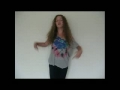
You are invited to watch "Heroes' Tribute (Thank You)", a song by Jierra Clark. Video directed by Krys Fehervari.
For centuries, men and women have given and sacrificed much for this country, their convictions of patriotism and our freedom. Now there is a song that simply thanks them for their service and sacrifice, "Heroes' Tribute (Thank You)".
Jierra and Krys felt that a tribute should be made to say thank you simply for their heroic gift of service; a video that highlights the heart and humanity of the military.
Jierra Clark is a phenomenal vocal talent. The strength and passion in her voice are the perfect choice for a tribute song for the military. Krys Fehervari is an amazing artist that simply "makes things happen." The two have teamed up to create the music and video tribute that has been on the hearts of many civilians, who want to simply say, "Thank You! - for the benefits of our freedom".
If you’re looking for that promise of breathtaking romance that will curl your toes and leave you breathless, check out the worlds of USA Today Bestselling author Jennifer St. Giles! Whether it’s historical romance, paranormal, thriller or contemporary there’s love, happy ever after and a fantastic story! She may write as Jennifer St. Giles, JL Saint or Jennifer Saints, whatever the name, the amazing story is the promise! Find out more at http://jenniferstgiles.com/ Romance and thriller
Japanese Phrases FREE is an amazing, interactive app that is dynamic, comprehensive, and proven to work. With interesting and culturally relevant lessons you can learn to speak Japanese naturally, perfect your pronunciation, and build your Japanese vocabulary for FREE.
Check out the app here - http://itunes.apple.com/us/app/japanese-phrases-free/id303734644?mt=8
Learn how you can easily enable Emoji keyboard on your device!
Send amazing emoji pictures, unique emoticons, turn any word into emoji preset in a tap, and more! Get ultimate Emoji Emoticons Art iOS app https://itunes.apple.com/app/id593449409
How to enable Emoji 2 Keyboard on iOS 6
- Open Settings
- Go to General
- Scroll down and tap Keyboard
- Select Keyboards
- Tap Add New Keyboard
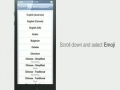
- Scroll down and select Emoji
- Emoji keyboard has been activated. Now you can use Emoji in Messages, Notes, Contacts, and more!
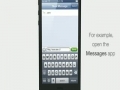
- Open the Messages app, for example
- Tap and hold the Globe at the bottom and then select Emoji
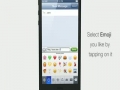
- Select the Emoji you like by tapping on it